Untangling the Compression Mess
For the longest time, compression felt like an endless pile of open-source alphabet soup.
.zip, .gzip, .tar.gz, .tar.xz, .tar.sz, .zst, .lz4...
Every tool had its own extension, and nobody ever cleaned up the old ones.
Software never dies. It just accumulates.
That's the real problem. Nobody wants to break a legacy system that has been running fine since 1995, so we never remove the older shape. We just slap a new layer on top.
Unless you know how the pieces actually connect, it looks like pure madness.
The Ground Truth
Strip away the extensions. There are only two fundamental concepts here:
Archivers bundle files.
**Compressors shrink bytes.**

- The Organizers (Archivers): Take 50 files, preserve directory trees, file names, and Linux permissions, and pack them into a single file (
.tar). They don't shrink a single byte. - The Shrinkers (Compressors): Take a raw byte stream and squeeze it. They have no idea what a folder is. If you feed them a directory, they choke.
The Unix Formula: tar + Compressor = Extension
Once you realize that tar only packs files into a raw binary stream, the entire constellation of Linux extensions clicks into place.
You take the tar stream and pipe it into whatever shrinker algorithm fits your job:
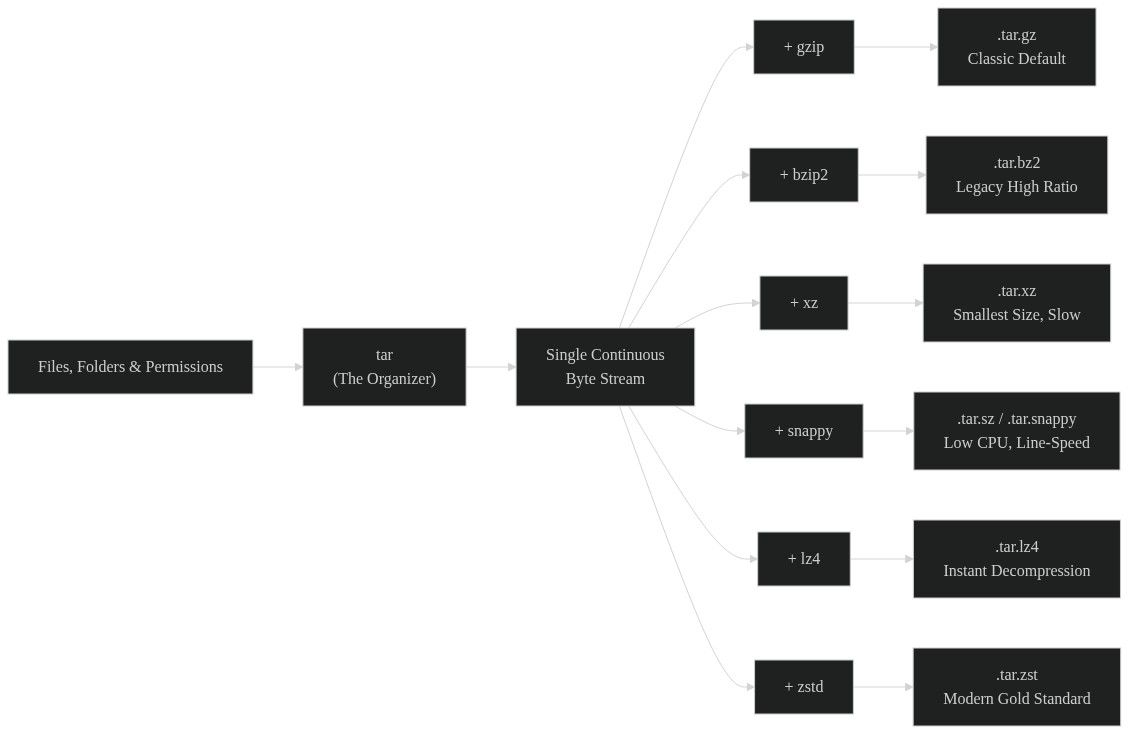
tar+gzip=.tar.gz
The 1990s workhorse. Balanced speed, decent shrink, supported everywhere.tar+bzip2=.tar.bz2
The older slow-burn option. Compresses smaller than gzip, but chews CPU cycles.tar+xz=.tar.xz
Maximum shrinkage. Uses huge memory and crawls on compression, but produces tiny binaries.tar+snappy=.tar.sz(or.tar.snappy)
Google's speed play for big data. Barely shrinks, but flies at network line-speed.tar+lz4=.tar.lz4
The decompression speed demon. Unpacks data at gigabytes per second per core.tar+zstd=.tar.zst
The modern standard. Beats gzip on compression ratio while rivaling snappy on speed.
The ZIP vs. Tarball Trap
I used to believe tar.gz had some magic compression algorithm that beat regular .zip.
Turns out, it's just an architectural trade-off between random access and solid compression.
1. The ZIP Model: Per-File Compression
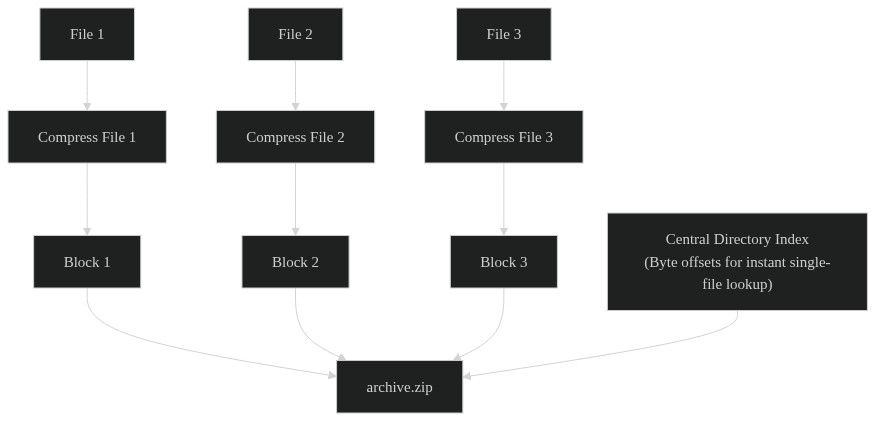
.zip compresses each file individually, then stamps a central directory index onto the end of the archive.
- The win: Instant random access. If you need one file from a 10 GB archive, the system reads the index, jumps straight to that byte offset, and unpacks only that file.
- The loss: Zero cross-file deduplication. If you pack 100 log files with identical headers,
.zipcompresses each file in total isolation and leaves all that shared data on the table.
2. The Tarball Model: Solid Compression
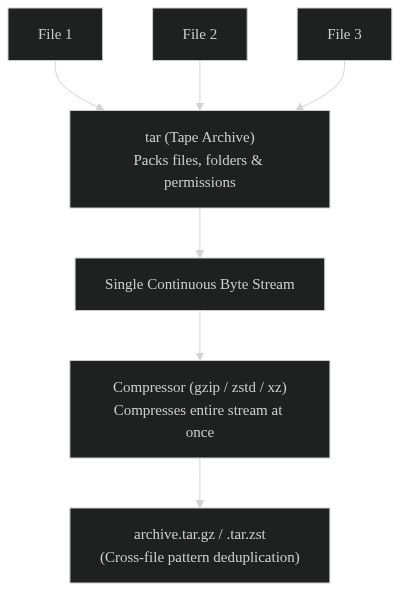
tar glues all files into a continuous binary stream first, then feeds that whole stream into a compressor.
- The win: Massive space savings. The compressor looks across the whole archive as one giant file. Repeated patterns across different files get crushed.
- The loss: Zero random access. If you want the last file in a 10 GB tarball, your CPU has to decompress through the whole stream until it gets there.
.zipputs 10 items into 10 separate Ziploc bags, then puts the bags in a box.
.tar.gzdumps all 10 items into a vacuum-seal bag and sucks the air out at once.
Why Snappy and LZ4 Even Exist
If you run into Snappy or LZ4 in data pipelines, your first instinct is to wonder why your personal backups aren't using them.
The answer is simple: they barely shrink files.
Google built Snappy for distributed infrastructure. When you move petabytes of data across thousands of servers, heavy compression melts your CPUs. But running zero compression chokes the network cables.
Snappy and LZ4 don't care about tiny files. They care about matching hardware line-speed.
They strip out heavy entropy math and focus on fast byte-matching.
- Snappy: Shrinks data just enough to clear network bottlenecks without stalling pipelines.
- LZ4: The fastest decompression around, unpacking data at multi-gigabytes per second per core. It lives inside ClickHouse and RocksDB for hot-path queries.
If you use them on a cold backup, you're just wasting disk space.
tar.gz vs. tar.xz
When you actually want small files on Linux, the classic face-off was Gzip vs. XZ:
| Format | Engine | Dictionary Window | Speed | Best For |
|---|---|---|---|---|
tar.gz |
DEFLATE | 32 KB | Fast | Daily scripts, fast CI/CD builds |
tar.xz |
LZMA2 | 8 MB to 64 MB+ | Painfully slow | Linux kernel releases, distros |
Gzip only looks back 32 KB. If a pattern repeats 64 KB away, Gzip misses it entirely.
XZ opens up a massive 64 MB window. It takes a ton of RAM and CPU time to crunch, but it squeezes out an extra 30% to 50% space savings.
The Modern King: Zstandard (zstd)
For decades, you were forced to make a compromise:
- Fast but fat (Snappy)
- Middle-of-the-road (Gzip)
- Tiny but crawling slow (XZ)
Then Yann Collet at Meta created Zstandard (zstd), and basically broke the trade-off.
Zstd scales across 22 levels.
At level 1, it flies near Snappy speeds.
At high levels, it gets close to XZ compression while unpacking way faster.
That's why Arch, Fedora, and Ubuntu dumped tar.gz and tar.xz for .tar.zst packages, and why Apache Iceberg and Parquet use it as their default.
The Quick Cheat Sheet
Forget the decades of baggage. Here is how to pick today:
- Sending files to normal human beings:
.zip(works everywhere, zero explanation needed). - Linux scripts and quick tarballs:
.tar.gz(the universal fallback). - Modern local backups and package archives:
.tar.zst(fast, tight, and painless). - Maximum cold archival where time doesn't matter:
.tar.xzor high-level.tar.zst. - Real-time databases and memory caches:
lz4orsnappy(pure line-speed throughput).
We'll probably still be double-clicking .zip files in 2050, but at least the madness makes sense now.